

Staff Screens and
the staff app
A separate staff layer where your team manages info pages, surveys and announcements. The login-free Staff App (PWA) lets each person pick a department and get targeted push. Staff content never appears in guest lists, announcement targets or notification audiences — hard isolation by design.
For hotels, resorts and venues
What are staff screens, and who are they for?
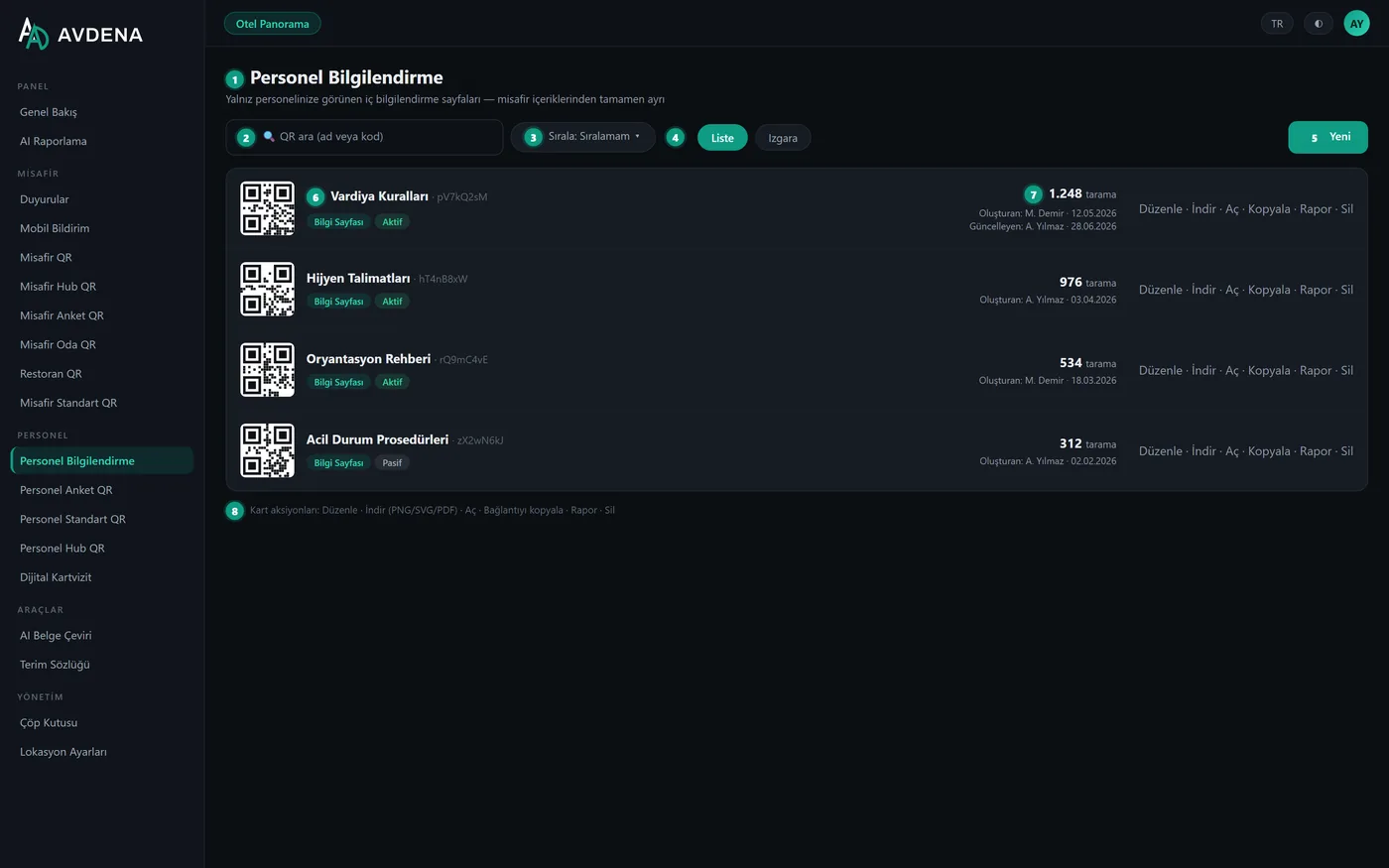
Avdena Staff Screens give your team a mirror of the guest tools, for staff only: shift rules, hygiene procedures, onboarding, surveys and announcements. This is the staff side of the QR Content Management module. With the login-free Staff App, each department gets its own targeted push — fully isolated from guest and waiter notifications.
Login-free PWA
Staff pick a department and get targeted push.
Hard isolation
Staff content never appears on the guest side.
Separate permissions
Per-audience roles: staff-only or guest-only access.
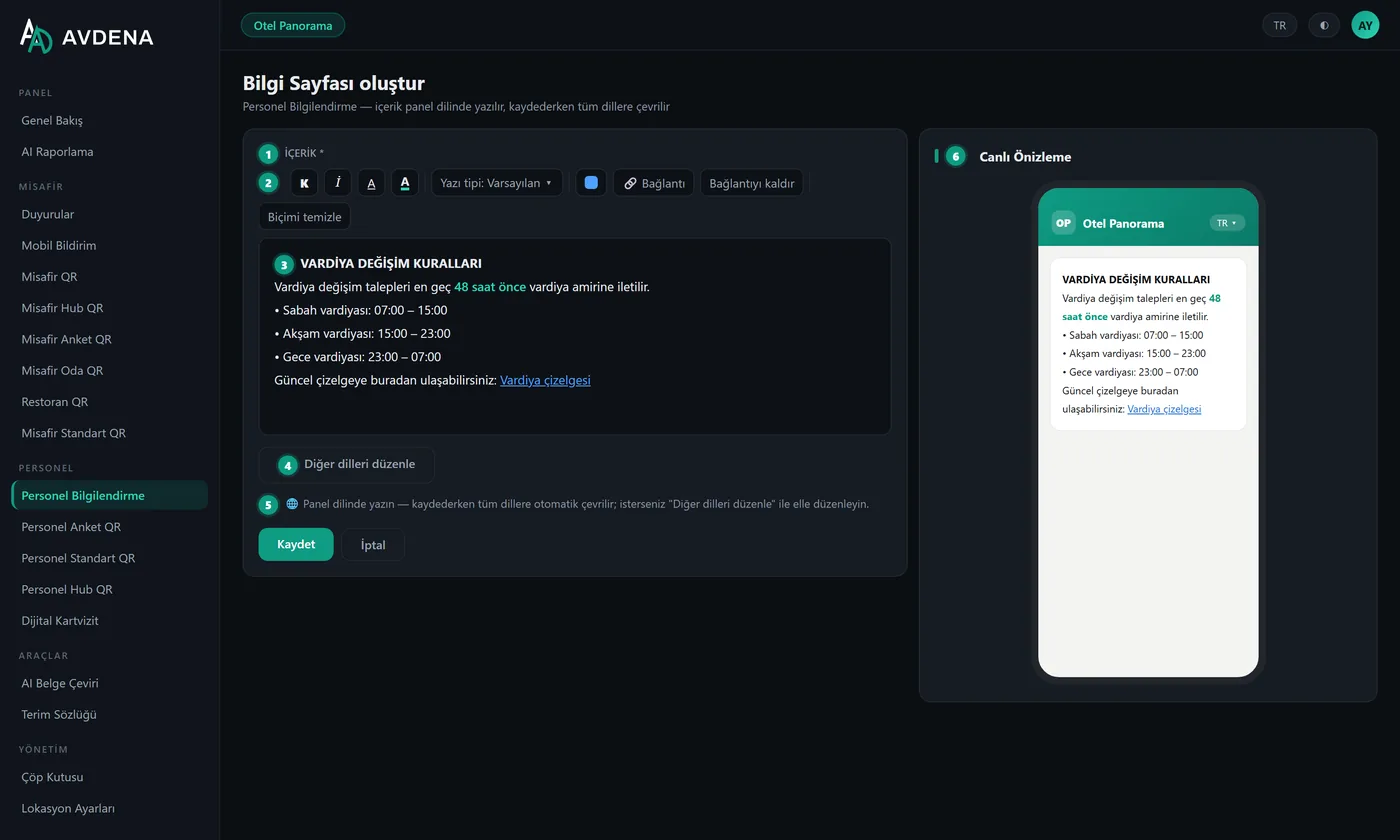
Rich info pages
Rich text with fonts, colours and links.
A login-free, install-once staff app
Staff install the app once on their phone, pick their department and get the targeted push sent to that department. It is fully isolated from guest and waiter notifications.
- Login-free install; no store/download
- Department selection + targeted push
- Isolated from guest/waiter notifications
A login-free, install-once staff app
- Login-free install; no store/download
- Department selection + targeted push
- Isolated from guest/waiter notifications
Shifts, hygiene and onboarding — in one place
Shift rules, hygiene procedures and onboarding content, authored in a rich-text editor with fonts, colours and links, and shared via QR.
- Rich-text editor (fonts, colours, links)
- Fast access via QR
- Multilingual
Anonymous team surveys and a Staff Hub
Anonymous team surveys with the same 8 question types and per-question analytics. The Staff Hub gathers all the team’s resources (documents, links, surveys) on one start screen.
- Anonymous team surveys, per-question analytics
- Staff Hub: documents, links, surveys
- Staff Standard QR: intranet, WiFi, documents
A hard wall separates staff and guest sides
Staff tools mirror the guest tools but live behind a hard wall: separate menus, separate reports, separate permissions.
- Separate menus, reports and permissions (per-audience roles)
- Staff QRs can never be picked as guest notification targets
- Give a user only the staff side — or only the guest side
A hard wall separates staff and guest sides
- Separate menus, reports and permissions (per-audience roles)
- Staff QRs can never be picked as guest notification targets
- Give a user only the staff side — or only the guest side
For every team
Kitchen & service
Hygiene procedures, shift rules, announcements.
Housekeeping
Room standards, checklists, onboarding.
Spa & entertainment
Programme announcements and department push.
Multi-location group
Separate staff content per property, from one panel.
A staff layer in three steps
Staff install the app
Login-free access; they pick a department.
Info & surveys open
Shifts, hygiene, onboarding and surveys in their own language.
They get targeted push
Department-specific announcements arrive as instant notifications.
Staff screens are part of the Avdena QR Content Management module:
Frequently asked questions
The most common questions about staff screens and the staff app.
What is the staff app?
A login-free, install-once PWA. Staff add it to their phone, pick a department and get the targeted push sent to that department — fully isolated from guest and waiter notifications.
Is staff content visible to guests?
No. There is hard isolation by design: staff content never appears in guest lists, announcement targets or notification audiences. Separate menus, separate reports, separate permissions.
Is a login/password required?
The Staff App is login-free; staff pick a department to get targeted push. Management in the panel is done by authorised users.
What can staff info pages contain?
Content like shift rules, hygiene procedures and onboarding, authored in rich text with fonts, colours and links and shared via QR. It is multilingual.
Are staff surveys anonymous?
Yes. You can run anonymous team surveys with the same 8 question types and per-question analytics.
Can I give a user only the staff side?
Yes. With per-audience roles you can give a user only the staff side or only the guest side.
Are Staff Screens a separate product?
They are the staff side of the QR Content Management module; they come with it and are managed from one panel.
Let’s set up your staff layer today
Staff Hub, info pages, surveys and a login-free staff app — fully isolated from guests. We handle the setup with your brand and content.
Faults and requests are answered by e-mail.