

Your hotel’s entire food & beverage experience,
in one digital QR menu
Restaurant, bar, open buffet, poolside and room service… From an image-rich, multilingual menu to allergen info, from payment-free guest ordering to the kitchen printer — all in one panel, without ever reprinting. It reads from a single product pool: Products → Categories → Venues.
For hotels, resorts and restaurants
Enter a product once; group it into categories, categories into venues
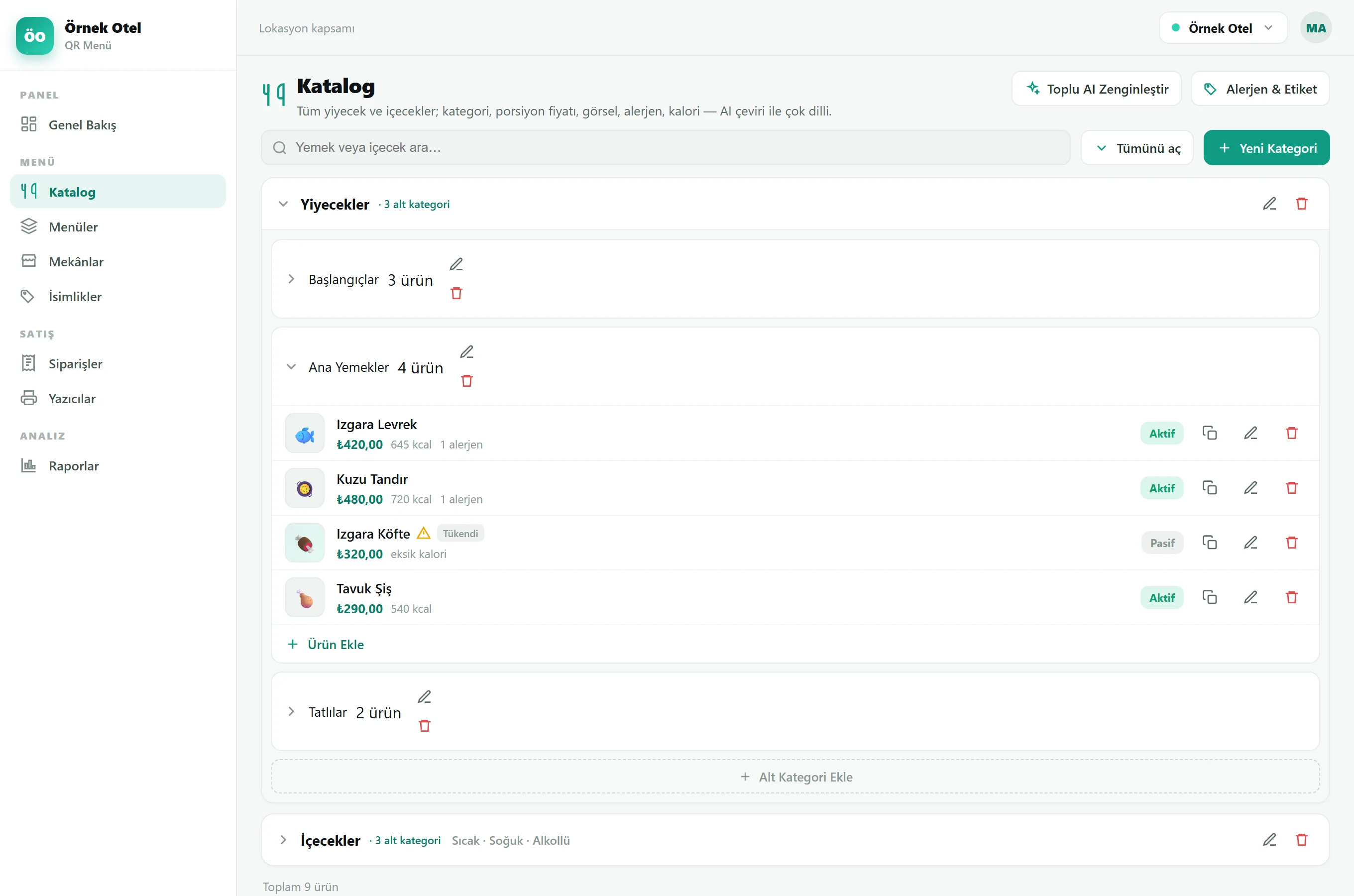
Products live in one shared pool; main categories become the guest’s tabs and sub-categories become chips; a category can be assigned to many venues and a venue can hold many categories.
One shared pool
Food & Drinks in a single pool with a three-level category tree. A product is entered once and is not tied to any venue.
Tabs & chips
Main categories become the guest’s tabs and sub-categories become chips — “Breakfast”, “À la carte”, “Bar”. Assign categories to venues; hide individual items per venue.
Restaurant · bar · room service
Categories are assigned to venues — restaurant and bar — each with its own theme, QR, currency and permissions. All-inclusive and room-service ordering live at this level; many categories on one venue become tabs for the guest.
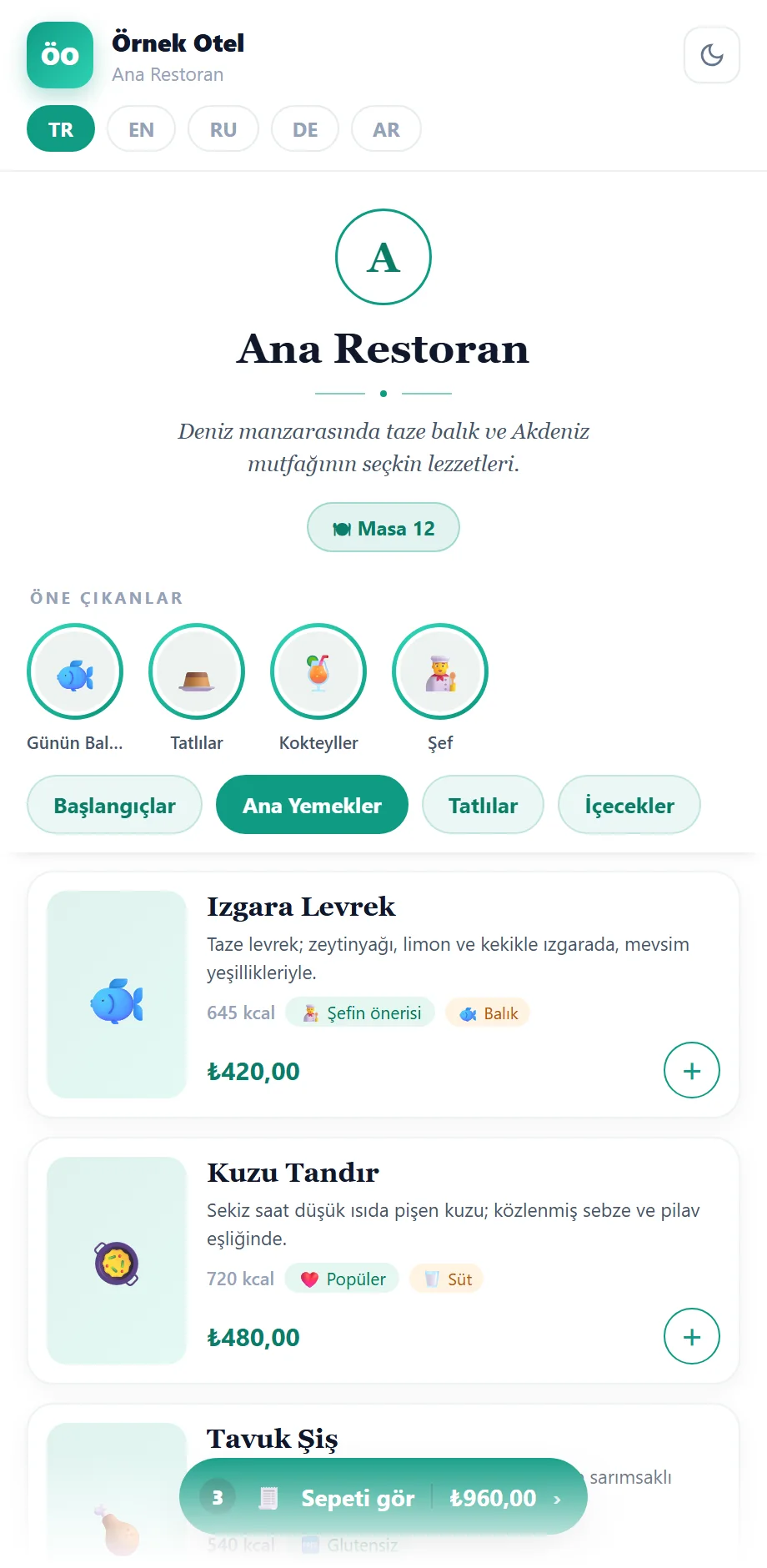
An image-rich, multilingual guest menu
The same content in six ready layouts (Card · List · Gallery · Elegant · Variant · Bordeaux); 20+ premium themes, a palette derived from your brand colour, a cinematic cover and a “Highlights” reel. The guest is served in 5 languages (TR·EN·RU·DE·AR), auto-translated and opened by browser language.
- 6 layouts · 20+ themes · light/dark mode
- Sticky category bar with scroll tracking
- Product detail modal: image, allergens, variant/extra picker
- Language switch + auto language; panel in 4 languages
- Story reel, prep videos and info banners on the guest menu
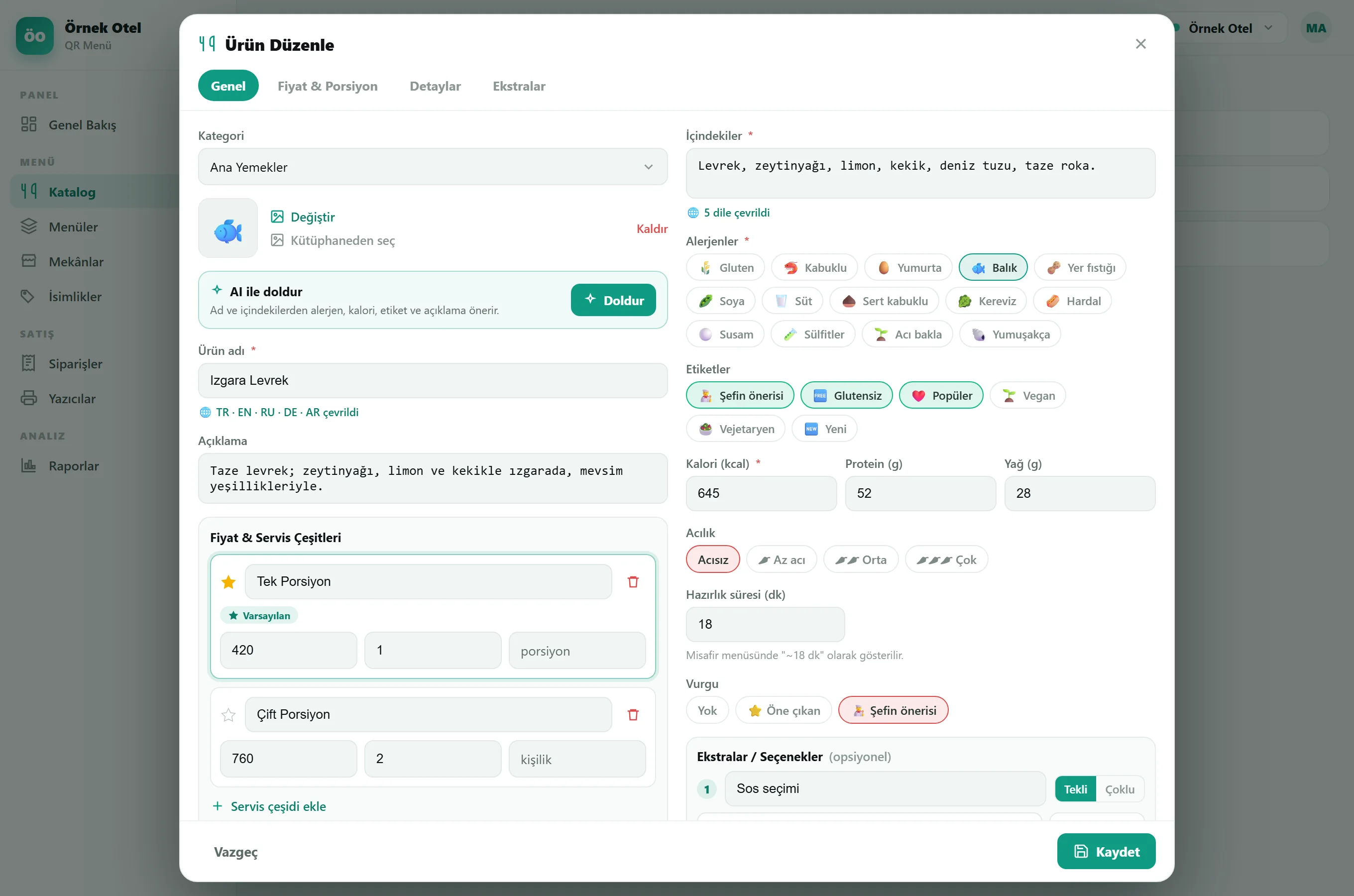
Everything you can hold in one product
A stepped product wizard adapts to the item type — dozens of fields, all optional. Drag-and-drop ordering, search and duplication are built in.
- Food & Drinks in one shared product pool
- Three-level category tree; a product entered once
- Search, duplicate and reorder built in
- Advanced editor: variants, portions and serving options + AI fill → a rich, multilingual card in minutes
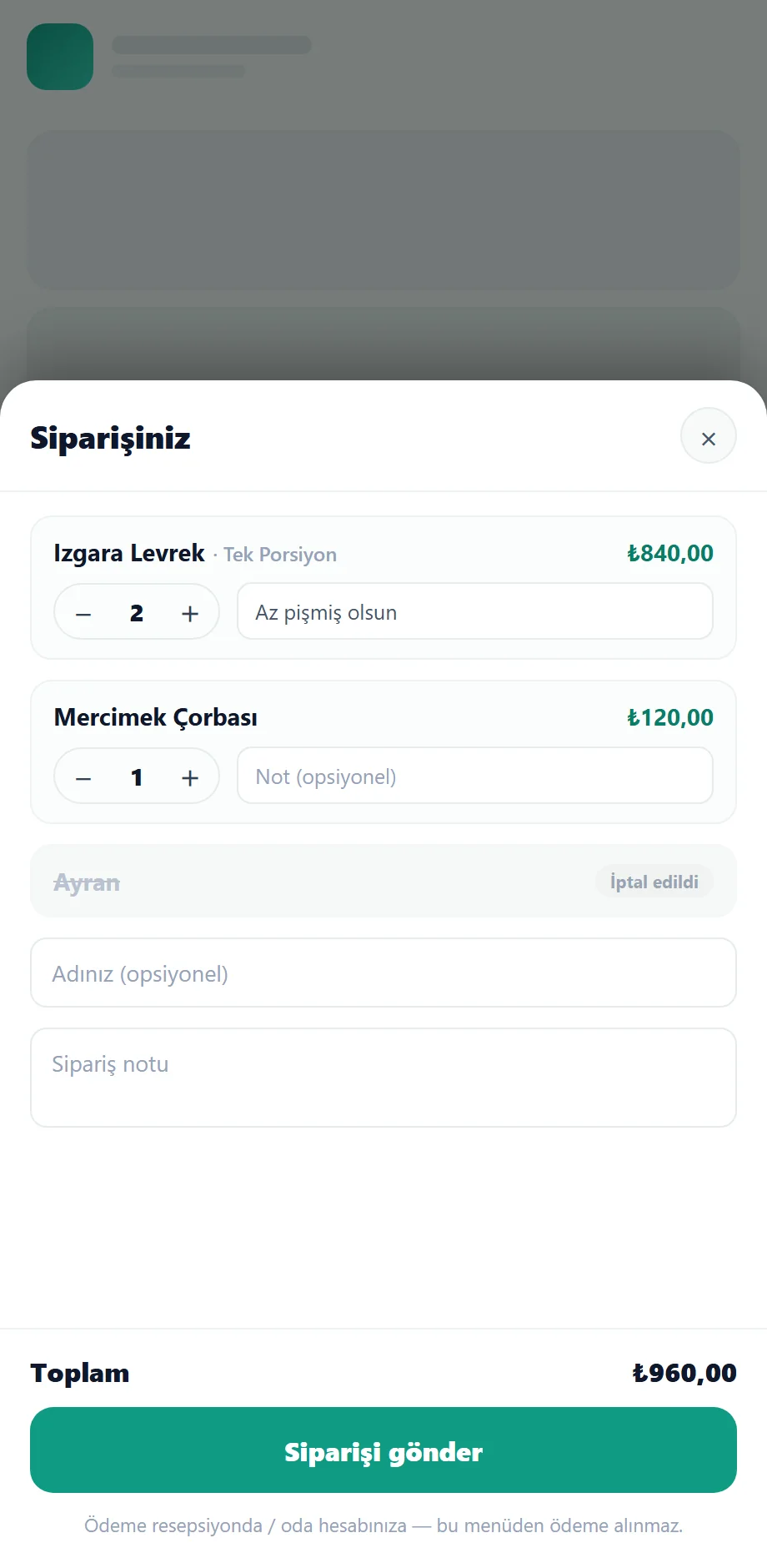
Payment-free ordering + a running tab
A hospitality-first flow that needs no payment integration: the guest builds a cart, adds a note and submits. The order drops onto the kitchen/bar printer and appears live in the panel. Payment stays in your existing flow (room account / reception).
- Cart + tab; the guest sees all their orders
- Table session: every order at that table joins one running tab
- Same item ×N on a single line; quantity +/− and partial cancel
- Service mode per venue: guest self-order or waiter-only
- Order routed to the right station: drinks to the bar, food to the kitchen
- Call waiter: the guest taps once to call a waiter to the table
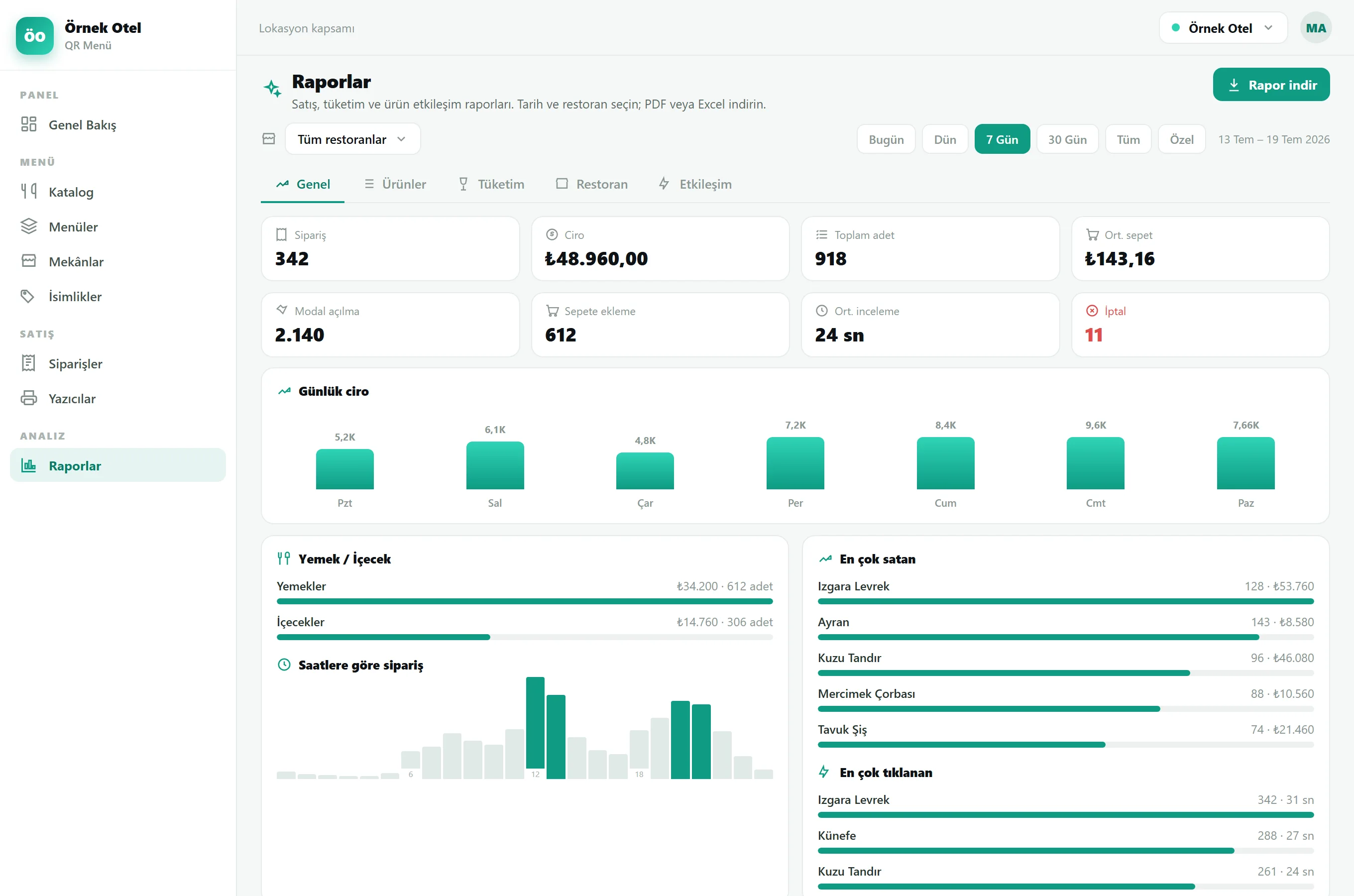
Your team takes, verifies and manages orders — tableside
The order lands on the printer and on staff phones at once. The Staff Hub installs as a PWA; a waiter opens the tables screen (empty / occupied), takes the order at the table, and a new ticket arrives as an instant push — even with the page closed — managed on the live “Orders” screen.
- Waiter app (PWA): tables screen, tableside order entry, live push
- Instant table search; per-restaurant assignment and switching
- Camera QR order verification (wrong-table warning)
- Real-time screen (WebSocket); food/drink split; partial or full cancel
- Staff management: multi-restaurant assignment, shifts, notification prefs
- Granular permissions per role: a waiter only takes orders, a chef edits the menu, a manager sees reports
- Call-waiter screen: a guest call reaches an online, assigned waiter instantly (60-sec presence)
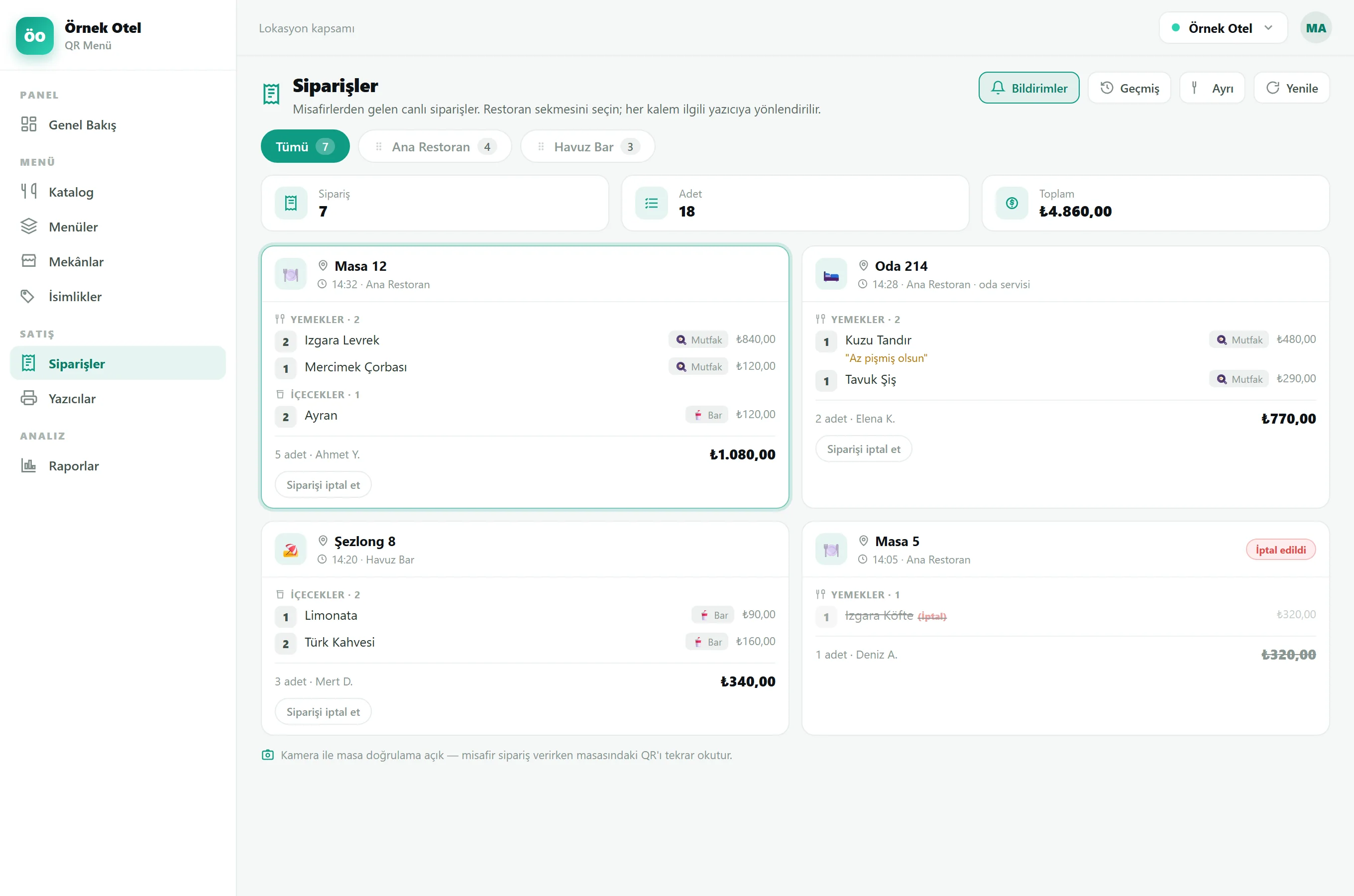
Multi-mode ESC/POS printing
Orders reach paper — at the right station, in the right language. It works with ESC/POS thermal printers; products are routed to stations, the ticket prints bilingually and cancellations show clearly in their own section.
- Product → printer routing (kitchen / bar / patisserie)
- Bilingual ticket: product name in local + guest language
- Two-part cancellation ticket: cancelled on top, to-prepare below
- Turkish ç/ö/ü and Cyrillic/Arabic encoded correctly — no garbled output
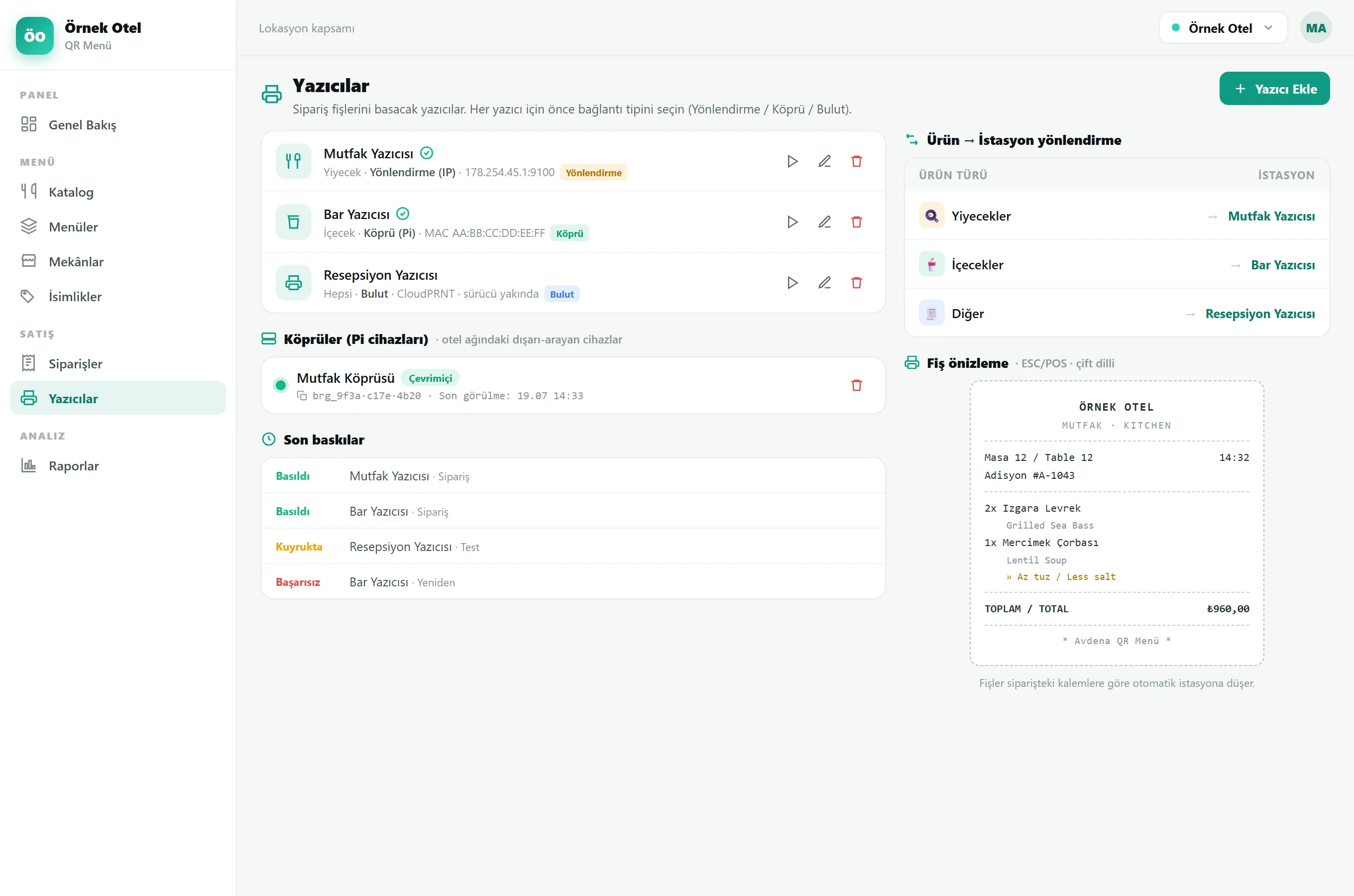
Multilingual, legal labels for the open buffet
In front of the buffet, generated automatically from menu data: the dish name in 4–5 languages on one card, next to the legal allergen notice. Pick a format, batch-select dishes and get a PDF — or print — in one pass. No manual typing.
- 8 formats · A7 / A6 / A5 sizes
- Multilingual name comes from the menu (TR·EN·RU·DE·AR)
- Legal allergen notice: icon + text (mandatory for unpackaged buffet food)
- Accent colour + business name; batch/single PDF + direct print
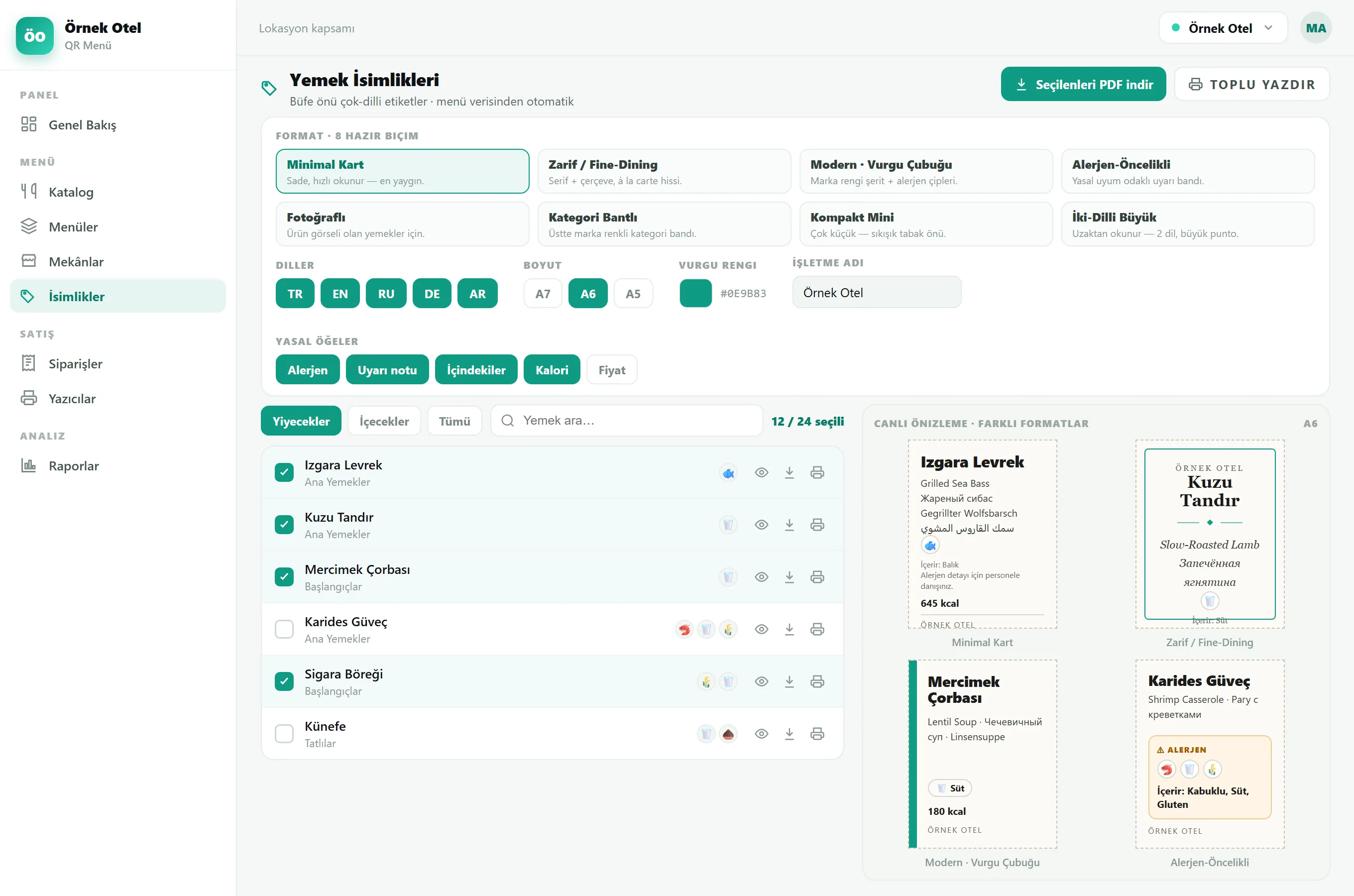
Menu data becomes decisions
Menu-specific reports: which product was viewed how much, in which language, and what was ordered. Chart-rich PDF + Excel; AI writes the interpretation.
- 5 report tabs specific to the menu
- Scan analytics and order analysis together
- Chart-rich PDF and Excel export
Type the product; let AI suggest the rest
Just enter the product name — Avdena QR Menu’s AI suggests likely allergens, nutrition, diet labels and a description in hospitality language. You approve and edit. Every visible text is auto-translated into 5 languages.
AI auto-fill
Allergens + calories/macros + diet label + description suggested in one click; the source is your own group AI key.
Tourism-grade translation
Natural translation (Main Restaurant, not literal); brand names preserved, consistent via the term glossary.
Variant & extra picker
The guest chooses size/portion and extras; the price is re-verified from the product on the server.
Security
The guest only sends the variant/extra key; the price is always resolved server-side — no manipulation possible.
Price is never generated by AI — that decision stays with you.
The right menu at the right hour — automatically
A whole menu, a single category or one product can appear and disappear on its own, by time of day, day of week and special dates. The breakfast menu shows only in the morning, cocktails only in the evening, happy-hour pricing only in its window — with no one touching the panel.
- Three levelsSchedule a menu tab, a category or a single product — the guest only ever sees what’s live right now.
- Time · day · special datesHours, weekdays and specific dates — a summer menu, a holiday closure, even an overnight window that crosses midnight.
- Reusable Service HoursDefine “Breakfast” or “Happy Hour” once, assign it in many places; change the hour and everywhere updates at once.
- Closed means closedOutside its window an item is hidden and cannot be ordered — availability is re-checked on the server, never trusted from the client.
Built additively: an item with no schedule is simply always visible — nothing on your existing menu changes until you choose to schedule it.
Enterprise-ready and compliant by design
The foundations that make the menu safe to roll out across an entire hotel group.
Designed QR
14 frames, corner/pixel shapes, gradients, logo, error correction — PDF·PNG·SVG. Codes for every table, bar and service point.
Granular RBAC
Verb-level permissions per person: a waiter only takes orders, a chef edits the menu, a manager sees reports. Menu management, order viewing and order cancellation are granted separately, per restaurant — an action a user isn’t allowed stays hidden.
All-inclusive price hiding
At all-inclusive properties prices are hidden — a clean, price-free showcase, chosen per venue.
Multi-currency
₺, €, $, £, ₽ — per venue.
Multilingual
Guest in 5 languages, panel in 4; every text you enter is auto-translated.
Compliance & security
Legal allergen notice; secret keys stored encrypted; guest content sanitised before display.
No app required
The guest menu opens in the browser; the Staff Hub is an optional PWA.
Real-time
Order and menu changes update on every device instantly.
Multi-location · white-label
All your hotels from one panel; one code base identical at every property, in your own brand.
Waiter app (PWA)
Staff install a tableside app: a tables screen, order entry at the table and live push — no hardware to buy.
Service modes
Per venue: let guests self-order, or restrict ordering to waiters only — the same menu, two flows.
Announcements on the menu
Push a timed announcement onto the menu and item pages — “happy hour”, a new dish — with no reprint.
Geographical indication
Highlight registered local products — appellation of origin / PGI with the Turkish Patent number — as a badge on the guest menu; cuisine and origin fields make heritage part of the sell.
2026 compliance dashboard
A readiness board for the 2026 food-information regulation: mandatory allergen, calorie, macro and ingredient checks, one-click AI fill for the gaps, and a legal menu PDF.
A venue for every service point
Create a Restaurant or a Bar for each service point — a pool bar, a beach bar, a room-service bar — each a full venue with its own theme, QR, currency and permissions. Poolside, beach and in-room service, all covered.
Call waiter & requests
Guests call a waiter with one tap; the request reaches an online, assigned waiter instantly and lands on a live calls board — the button hides automatically when no waiter is online.
Story, videos & feedback
Instagram-style stories, prep videos and timed info banners on the guest menu, plus per-product guest feedback — the menu becomes a content channel.
In-menu surveys
A professional survey engine built into the menu — as a pop-up when the menu opens, after an order, or as a banner; target the whole location, a restaurant, a menu or a category, with service-hour and date windows, 8 question types and a per-type results report.
Frequently asked questions
The most common questions about Avdena QR Menu.
Do guests have to install an app?
No. The guest menu opens in the browser with nothing to download. The Staff Hub is an optional PWA that staff can add to their phone.
Do we need a payment integration?
No. The flow is payment-free — it speeds up ordering and the kitchen flow and leaves payment in your existing setup (room account / reception).
Do I have to reprint the QR when the menu changes?
No. The QR is fixed; the content changes instantly from the panel. Even if the provider or the design changes, the code on the table stays the same.
Are allergens and nutrition included?
Yes. 14 EU allergens + custom allergens; an icon on the guest menu and a legal notice on the buffet label. Plus calories and macro nutrition.
How many languages are supported?
The guest side is auto-translated into 5 languages (TR·EN·RU·DE·AR); the panel is in 4 (TR·EN·RU·DE). Every text you enter is auto-translated.
Which printers does it work with?
ESC/POS thermal printers, with 3 connection modes (local bridge / forwarding / cloud). Bilingual tickets, station routing and a two-part cancellation ticket.
Can I hide prices?
Yes. At all-inclusive properties prices are hidden per venue, turning the menu into a clean, price-free showcase.
Can staff take orders at the table?
Yes. Staff install the waiter app (a PWA) and use a tables screen to take orders tableside; tickets print at the right station and every order at that table joins one running tab. You can also let guests self-order — it’s a per-venue setting.
Can the menu change by time of day?
Yes. A whole menu, a category or a single product can be scheduled by hour, weekday and special date — breakfast only in the morning, cocktails in the evening, happy-hour pricing in its window. Reusable “Service Hours” are defined once and assigned in many places; outside its window an item is hidden and cannot be ordered. The menu updates the instant a window opens or closes — no refresh needed — and an item whose window has passed is not lost from the cart: it is struck through and left out of the order.
Do we have to type every product from scratch?
No. Type a product name and AI fills the rest — a multilingual name, 14 EU allergens, calories, macros, portion weight, diet tags and description are suggested for you. You review, tailor the price, portion or description to your venue, and publish. AI never sets the price — you always do.
Can I limit what each staff member can do?
Yes. Permissions are granular and verb-level: a waiter can be allowed only to take orders, a chef only to edit the menu, a manager only to see reports — assigned per restaurant with ready-made presets. A user without a permission never even sees that menu, page or button.
Can I highlight geographical-indication or local products?
Yes. A product can carry a registered geographical-indication mark — appellation of origin or PGI — with its Turkish Patent number, shown as a badge on the guest menu, plus cuisine and origin fields. Heritage becomes part of the story you tell.
Is it compliant with the 2026 food-information regulation?
Yes. A compliance dashboard checks the mandatory fields — allergens, calories, macros and ingredients — flags what is missing, fills the gaps with one-click AI, and produces a legal menu PDF.
Does it work for the beach, the pool and room service?
Yes. You create a Bar for each service point — a pool bar, a beach bar, a room-service bar — each a full venue with its own theme, QR, currency and permissions. And guests can call a waiter with one tap — the button appears only when an assigned waiter is online.
Can I ask guests a survey from inside the menu?
Yes. A professional survey engine is built into the menu: it appears as a pop-up when the menu opens, after an order, or as a banner. Target the whole location, a restaurant, a menu or a category; bind it to service hours and a campaign date; offer 8 question types (stars, scale, multiple choice, text…) and get per-type results — all in 5 languages.
Let’s make your menu digital, multilingual and smart today
Restaurant, bar, open buffet and room service in one panel — from an image-rich multilingual menu to payment-free ordering, from allergen compliance to the kitchen printer. We handle the setup with your brand and your menu.
Faults and requests are answered by e-mail.